Adjusting the bike computer, particularly the speed, distance travelled and altitude functions, remains a problem for many cyclists. While recent computers offer an automatic calibration function, older models still require manual adjustment. Manual calibration isalso preferable for certain activities such as competitive training or cardio training, in order to obtain more accurate data. In this article, we will discuss methods for easily adjusting your bike computer.|> 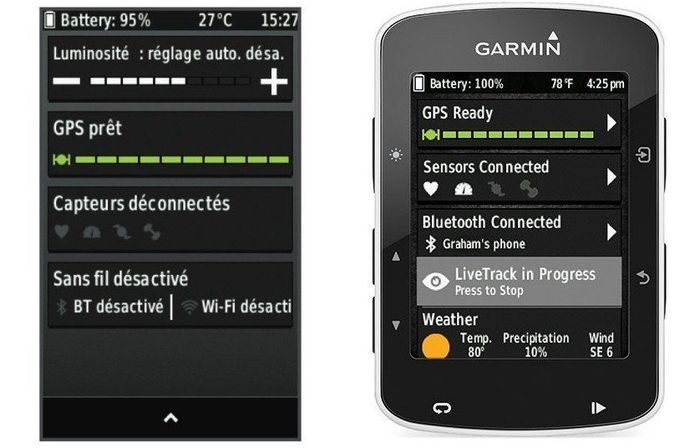
Garmin bike computer
Speed calibration at Polar
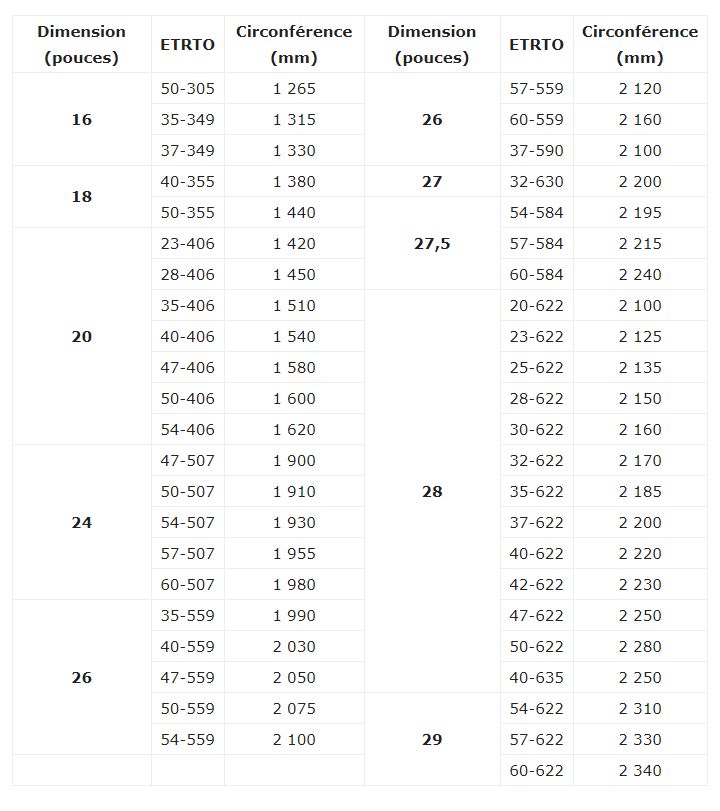
Simplicity for leisure and cycle touring If you cycle for leisure or tourism, quick access to the speedometer and odometer on the GPS coordinates should be sufficient.and the odometer based on GPS coordinates should be enough to collect data about your activities. GPS meters have an automatic calibration function that you can activate by browsing the options depending on the model. Conventional electronic meters require you to enter the circumference of your wheel in millimetres. The dimensions indicated in your computer's instructions should be suitable for cycle touring or leisure cycling, given that the accuracy rate of this data is around 95%.. You can also find the approximate circumference of your wheel in the table at the bottom of the page.
Greater accuracy for training and sport
However, the margin of error of up to 5% of the length of a wheel rotation, which can be significant in training for time trials, on circuits or on flat terrain, as well as in cardio training. In addition, other factors can influence the length of a wheel revolution, including pressure and your weight. Manual measurement becomes important in these activities to ensure optimal data accuracy. To measure the actual circumference of your wheel manually, inflate it to the recommended pressure for your discipline and weight. Draw a thin line of oil across the tread of one of your tyres. The line of oil should be thin and should not run onto your tyre.oil line should be thin and should not run down your tyre. Now ride your bike in a straight line, making two complete turns of the wheels from the first oil mark. You will have three oil marks on the ground to measure the exact circumference of your tyre. The two intervals will allow you to check your measurements and avoid making mistakes. Try to wipe off any remaining oil on your tyre with a cloth after taking the measurements so as not to dirty your bike when riding. You can now enter the actual circumference of your inflated and loaded wheel on your bike computer.
Installing sensors on Mio
The barometric altimeter for climbers
The use of a barometric altimeter is essential for obtaining more accurate information about routes with elevation changes, whether on road bikes or mountain bikes. Although GPS bike computers with this feature can be calibrated automatically, some cyclists prefer to adjust the settings manually to ensure greater accuracy. Models without GPS require manual calibration of the altimeter. The barometric altimeter provides data by interpreting variations in atmospheric pressure relative to a starting reference. this pressure gradually decreases as altitude increases. Our meter calculates thecurrent altitude by capturing this pressure and comparing it with the basic data we have provided for a precise levelling reference.
Altimeter adjustment on Bryton
To calibrate the barometric altimeter on your meter, you must enter the altitude of a starting point near your home. The altitude of a specific location is often indicated on bridges or mountain passes. You can also locate an IGN levelling reference point to calibrate the altimeter on your meter even more accurately. There are 350,000 of these reference points across Francecan be easily located on a map on the IGN (Institut national de l'information géographique) website.
To locate the nearest levelling reference point, go to this link (http://geodesie.ign.fr/fiches/index.php?module=e&action=visugeod). When you access the page, you will see a simple map of France, but when you zoom in, you will begin to see triangular benchmarks, starting from the40 km scale (1/272989), to which will be added circles on a 5 km scale (1/68247).
The yellow circles are the ones we are interested in. When you have located one near you, press the "i" key on your keyboard or click on the "Information on sites and markers" icon above your map. Then point your mouse at the yellow circle you have located to display the rack's registration number and its exact altitude. The PDF iconPDF icon allows you to download complete information about your levelling reference point, including a photo of its location. All you have to do now isnote the altitude and go to the location to calibrate the altimeter on your computer.
Configuring the Sigma Rox 10.0
Wheel circumference to enter in your meter
Garmin bike computer
Setting your bike computer: speed and distance
Recent models of speedometers have abandoned the magnetic sensor in favour of GPS and the accelerometerThe older models still require manual calibration.Speed calibration at Polar
Simplicity for leisure and cycle touring If you cycle for leisure or tourism, quick access to the speedometer and odometer on the GPS coordinates should be sufficient.and the odometer based on GPS coordinates should be enough to collect data about your activities. GPS meters have an automatic calibration function that you can activate by browsing the options depending on the model. Conventional electronic meters require you to enter the circumference of your wheel in millimetres. The dimensions indicated in your computer's instructions should be suitable for cycle touring or leisure cycling, given that the accuracy rate of this data is around 95%.. You can also find the approximate circumference of your wheel in the table at the bottom of the page.
Greater accuracy for training and sport
However, the margin of error of up to 5% of the length of a wheel rotation, which can be significant in training for time trials, on circuits or on flat terrain, as well as in cardio training. In addition, other factors can influence the length of a wheel revolution, including pressure and your weight. Manual measurement becomes important in these activities to ensure optimal data accuracy. To measure the actual circumference of your wheel manually, inflate it to the recommended pressure for your discipline and weight. Draw a thin line of oil across the tread of one of your tyres. The line of oil should be thin and should not run onto your tyre.oil line should be thin and should not run down your tyre. Now ride your bike in a straight line, making two complete turns of the wheels from the first oil mark. You will have three oil marks on the ground to measure the exact circumference of your tyre. The two intervals will allow you to check your measurements and avoid making mistakes. Try to wipe off any remaining oil on your tyre with a cloth after taking the measurements so as not to dirty your bike when riding. You can now enter the actual circumference of your inflated and loaded wheel on your bike computer.
Installing sensors on Mio
Setting your bike computer: the altimeter
Between GPS altimeters and barometric altimeters, the difference lies in criteria of accuracy and ease of use. GPS altimeter This type of altimeter is easy to use and can be adjusted automatically as soon as the counter is connected. This feature is very practical for leisure or hiking on relatively flat terrain. However, the information provided by the GPS altimeter is not very accurate, unlikeon relatively flat terrain. However, unlike a barometric altimeter, the information provided by the GPS altimeter is not very accurate.The barometric altimeter for climbers
The use of a barometric altimeter is essential for obtaining more accurate information about routes with elevation changes, whether on road bikes or mountain bikes. Although GPS bike computers with this feature can be calibrated automatically, some cyclists prefer to adjust the settings manually to ensure greater accuracy. Models without GPS require manual calibration of the altimeter. The barometric altimeter provides data by interpreting variations in atmospheric pressure relative to a starting reference. this pressure gradually decreases as altitude increases. Our meter calculates thecurrent altitude by capturing this pressure and comparing it with the basic data we have provided for a precise levelling reference.
Altimeter adjustment on Bryton
To calibrate the barometric altimeter on your meter, you must enter the altitude of a starting point near your home. The altitude of a specific location is often indicated on bridges or mountain passes. You can also locate an IGN levelling reference point to calibrate the altimeter on your meter even more accurately. There are 350,000 of these reference points across Francecan be easily located on a map on the IGN (Institut national de l'information géographique) website.
To locate the nearest levelling reference point, go to this link (http://geodesie.ign.fr/fiches/index.php?module=e&action=visugeod). When you access the page, you will see a simple map of France, but when you zoom in, you will begin to see triangular benchmarks, starting from the40 km scale (1/272989), to which will be added circles on a 5 km scale (1/68247).
The yellow circles are the ones we are interested in. When you have located one near you, press the "i" key on your keyboard or click on the "Information on sites and markers" icon above your map. Then point your mouse at the yellow circle you have located to display the rack's registration number and its exact altitude. The PDF iconPDF icon allows you to download complete information about your levelling reference point, including a photo of its location. All you have to do now isnote the altitude and go to the location to calibrate the altimeter on your computer.
Configuring the Sigma Rox 10.0
Wheel circumference to enter in your meter