
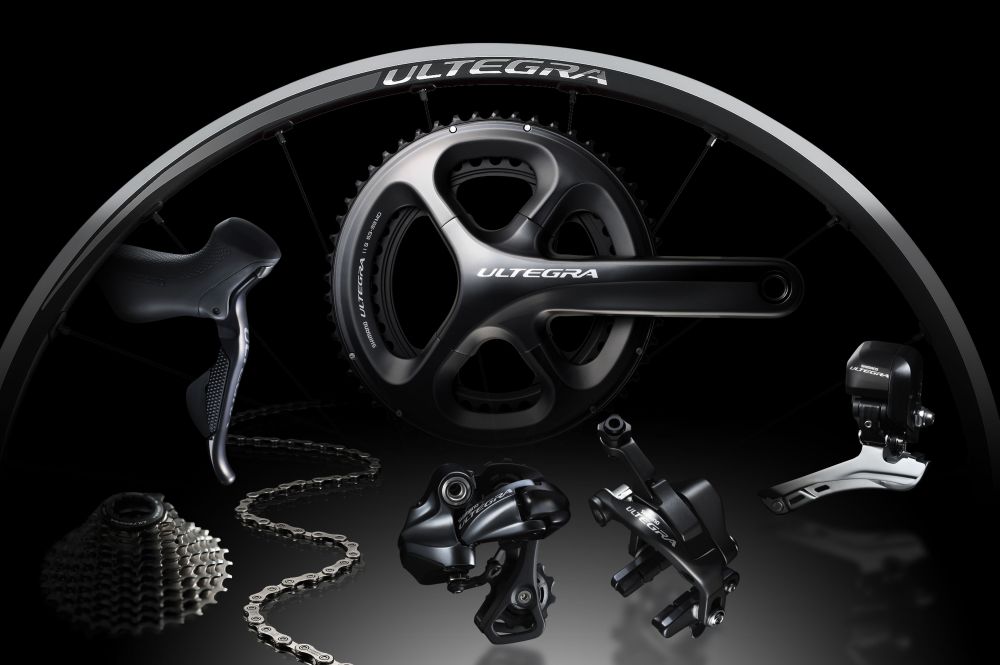
Shimano Ultegra Di2 6870 groupset.
Electric groupsets, particularly the Shimano Dura Ace Di2 and Ultegra Di2, are integratedin most high-end bikes from major manufacturers. They are also becoming increasingly popular as aftermarket replacements for mechanical groupsets.. Incidentally, many cyclists have questions about the compatibility and operation of Shimano Di2 groups.
First of all, let's review the different components that make up a Shimano Di2 electric transmission: a pair of levers, two derailleurs, a connection box (the brain of the system), a junction box (to distribute the signal between the different components), a battery holder and the battery.|>
Incompatibility between different Shimano Di2 groups!
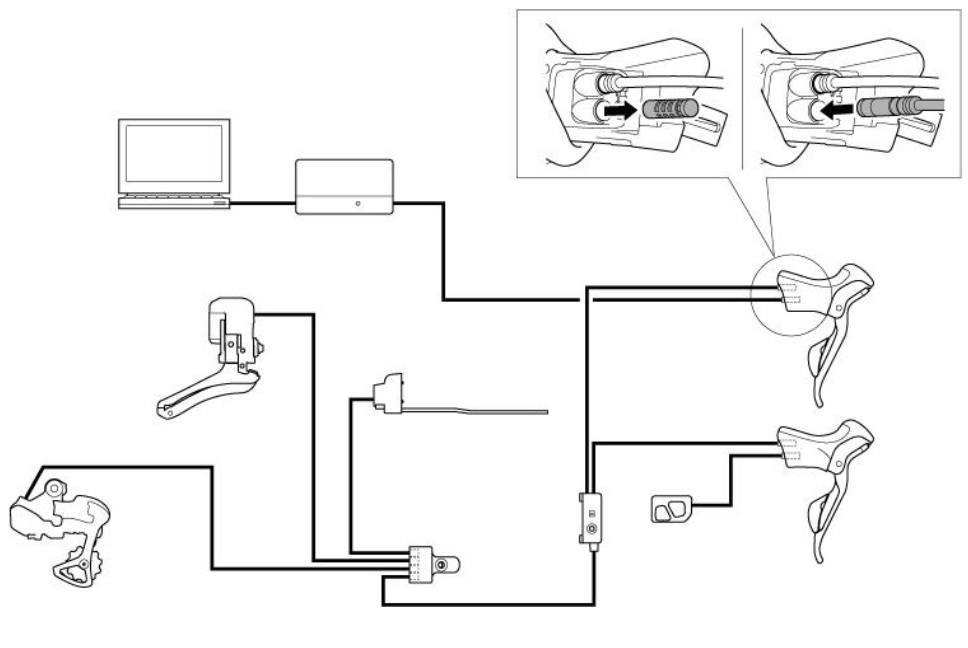
Shimano Di2 electric group wiring.
When the Shimano Dura Ace Di2 group was first introduced, the nerve centre of the system was a control box.. The connectors linking this box to the other components (derailleurs and battery support) were incompatible with any other groupset: Shimano certainly wanted to avoid"mixing genres". Today, the two Ultegra Di2 groups (10 and 11 speeds) and the Dura Ace Di2 11-speed group are based on the samecable system and the same connection box: they have the same brain. However, that is the only thing they have in common. The various components cannot be used separately, as is so easily done with mechanical versions. Currently, if you want to use a Dura Ace Di2 or Ultegra Di2 derailleur, you musthave the entire group!
In terms of adjustment precision and chainring and sprocket change speed, Shimano has equipped its group sets withelectrical groups with the performance we have come to expect. Speed and precision of gear changes are just the first advantages of Shimano Ultegra Di2 and Shimano Dura Ace Di2. The adjustments arealso simplified, do not vary over time and are not affected by weather conditions..
Shimano E-tube: the conductor
Shimano Di2 electric groupsets can be configured using the E-tube software, which can be downloaded from the Shimano website.With the launch of the Shimano Ultegra Di2 6870 electric group, this software now allows you to configure the rear derailleur's operating mode. This function, called Multi-Shift, allows you to determine the speed of gear changes, as well as the number of gears that will be shifted with each prolonged press of the shifter. Here we will see how to configure this function, butalso how to get started with E-tube. Please note that Multi-Shift works with Dura-Ace Di2 groupsets: all you need to do is update the software.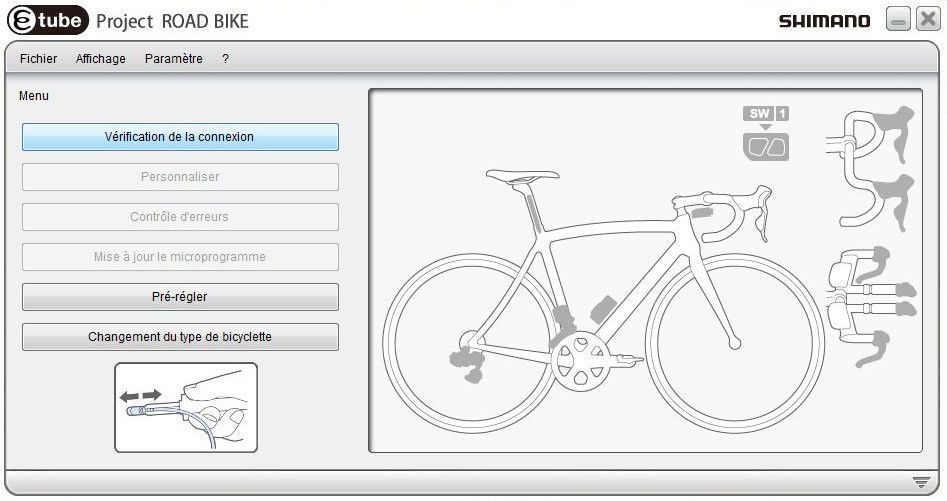
1. You are on the E-tube home menu. When, you will have downloaded the latest version of the software from the Shimano website. Your charger is connected to the Shimano Di2 group control unit and your charger is connected toto the computer via USB: you can start by clicking on "check connection"
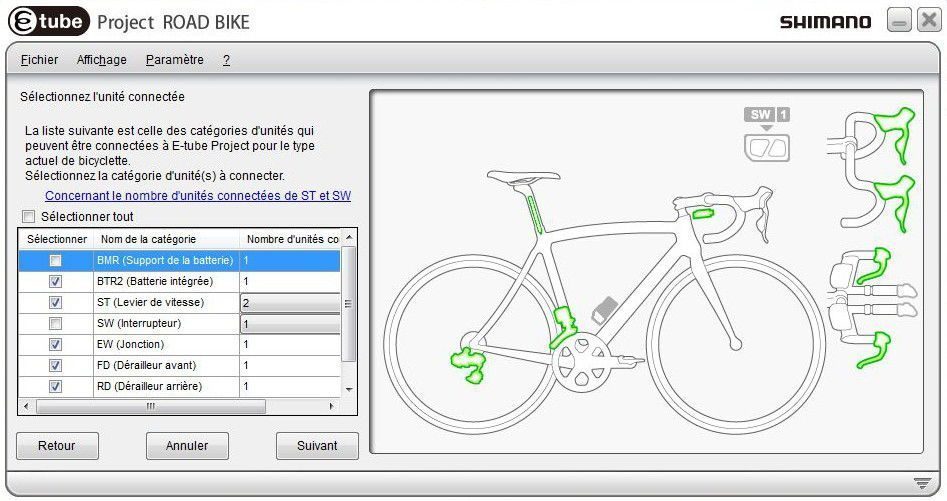
2. The differentThe various components of the Shimano Di2 group are recognised by E-tube: you can choose to work on all components or select one or more from the drop-down menu. Click on "Next".
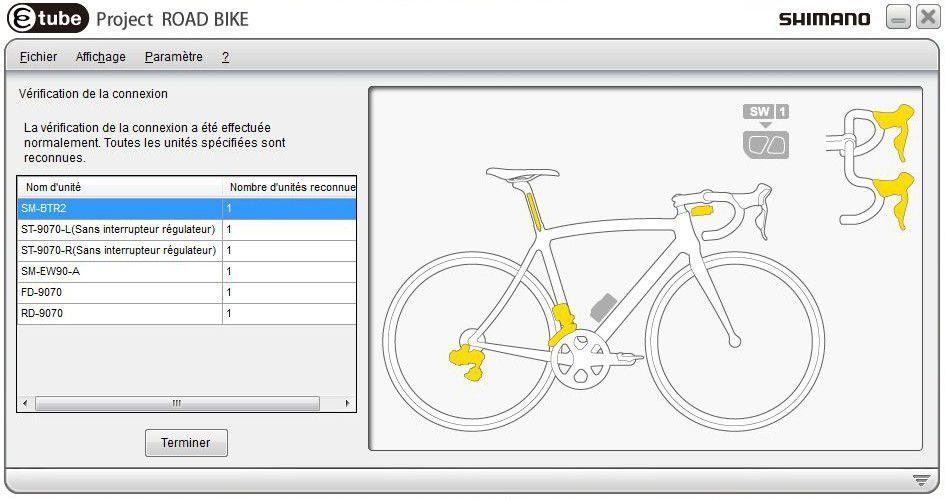
3. All Shimano Di2 group components are now connected. Click on "Finish" to return to the home menu.
4. If any components of the Shimano Di2 group need to be updated, a message will appear. Click on "OK" and you will be taken to the " Firmware update".
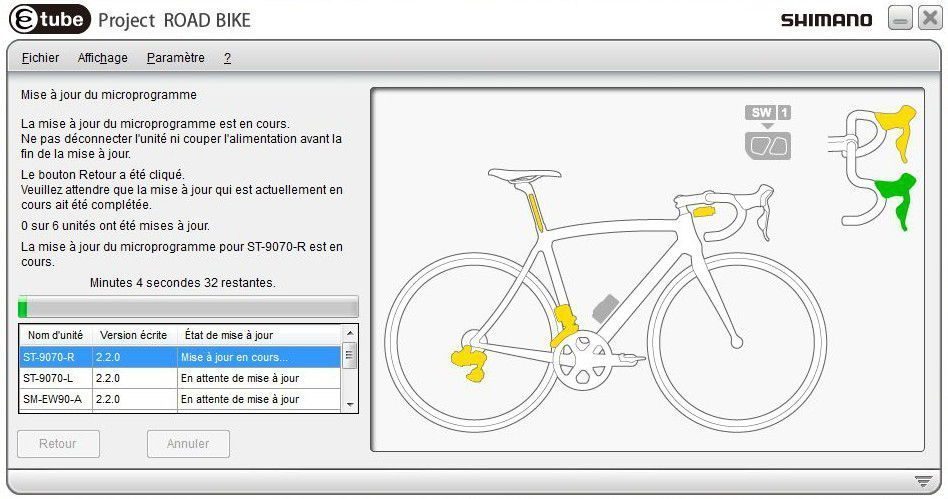
5.Select the components to be updated from the drop-down menu, then start the download. As progress, the updated components will appear in green.
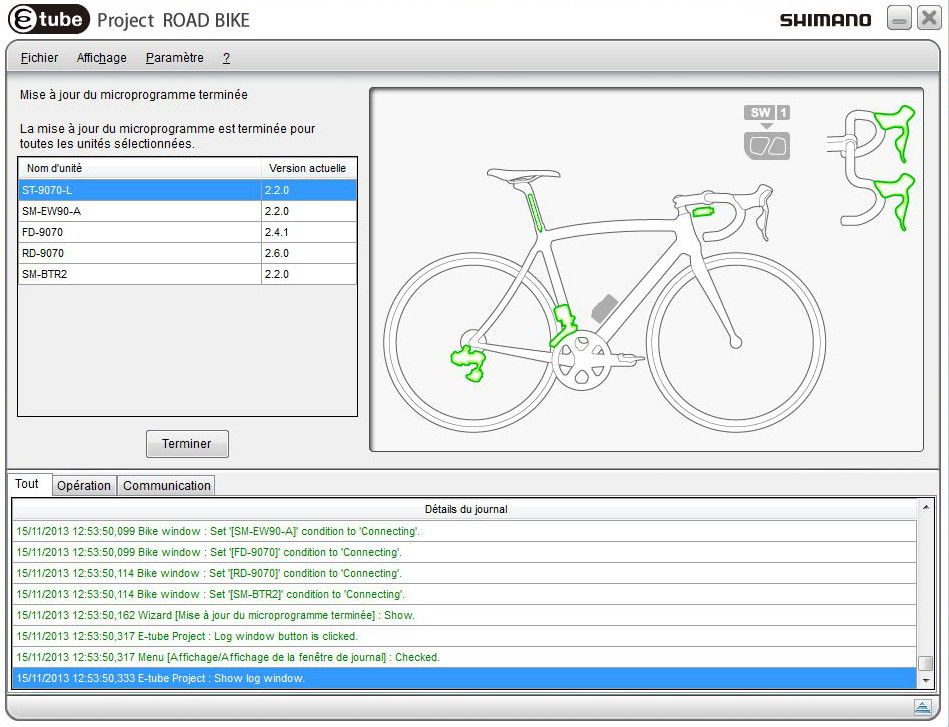
6. Congratulations, your Shimano Di2 components are now up to date! At the bottom of the menu, you can open the operation log if you want to find out what operations have been performed. You can also refer to it if any errors are reported. Click on "Finish" and you will be redirected to the home menu.
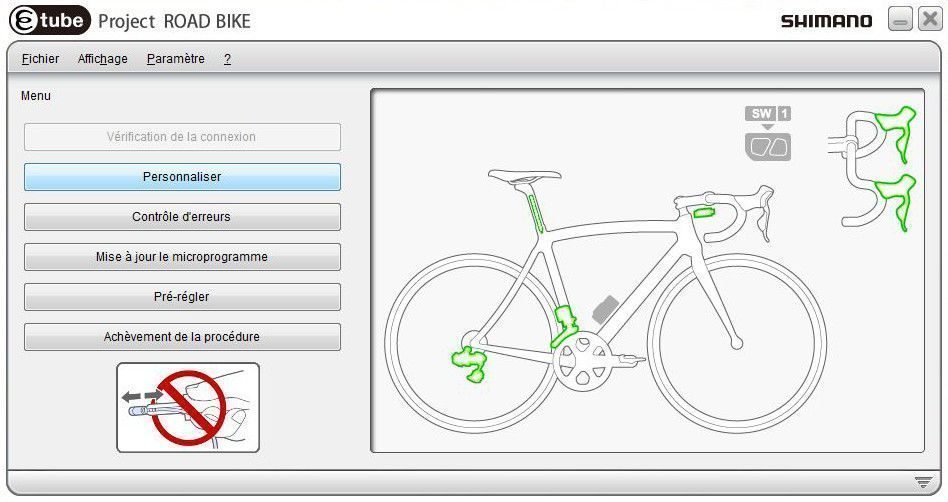
7. You are on the E-tube home menu. All components are up to date and green. It's time to customise your Shimano Di2 group with the Multi-Shift function: click on 'Customise'."Customise".
8. You have 4 choices in the &"Customise": we will leave the menus for adjusting the shifters and derailleurs for now and focus on Multi-shift mode. Click on"Multi-speed mode settings".
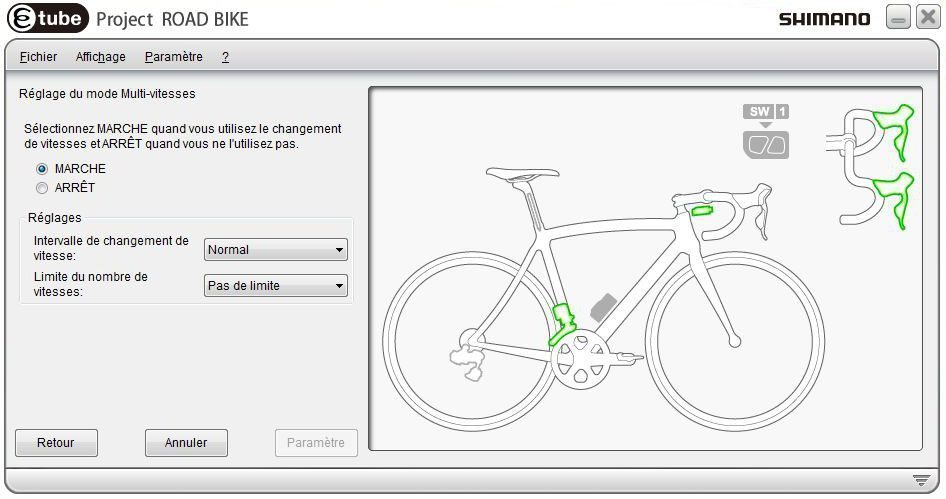
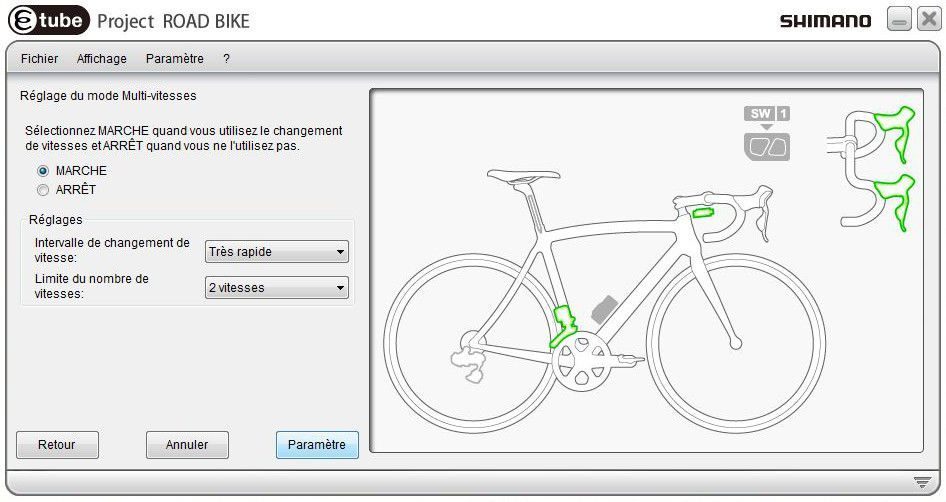
9. Click on "On" to activate Multi-Shift mode. In the "Shift interval" drop-down menu, you can select one of five rear derailleur shift speed modes: Very Slow, Slow, Normal, Fast, Very fast. In the "Number of gear limit" drop-down menu, you can choose to limit the number of gears that will be shifted when the shifter is pressed and held to 2 or 3.amp;eacute; on the shifter.
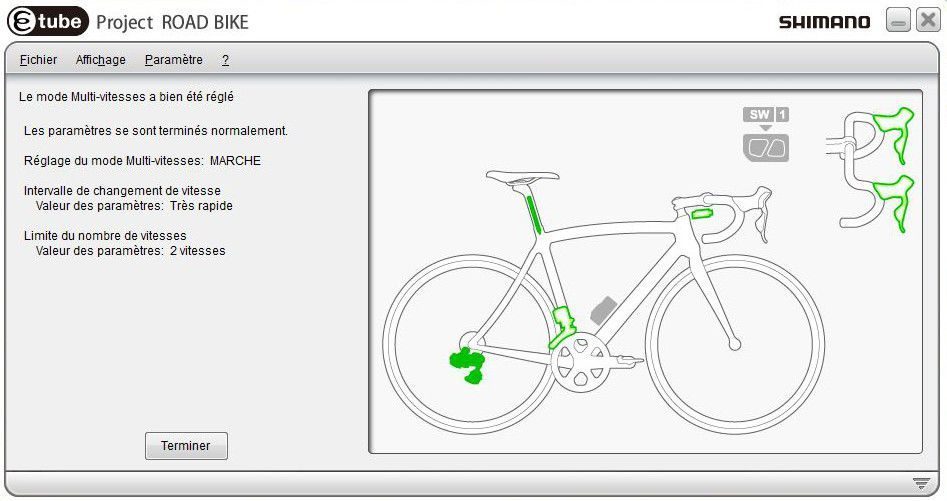
10. Your settings have been saved. Click on &"Finish".
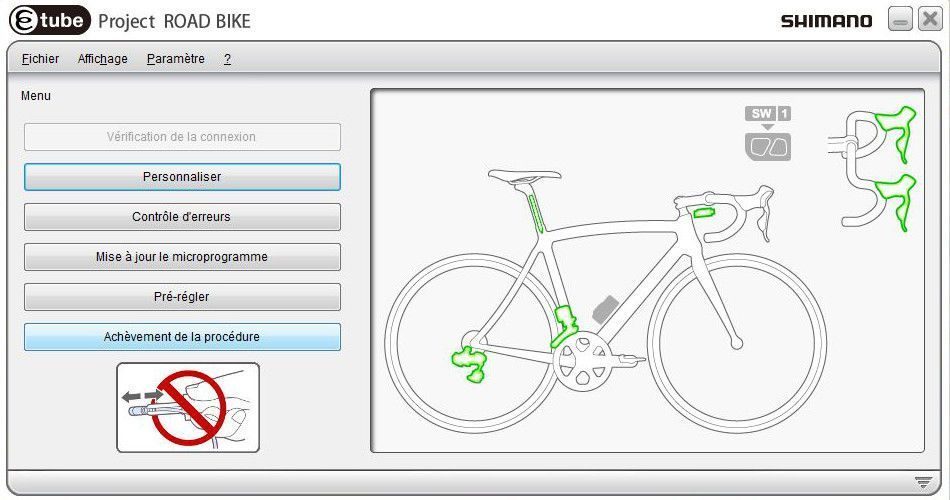
11. You are now back at the home menu. Click on "Complete procedure" to send the changes to the Shimano Di2 groupset. Do not disconnect the USB cable!
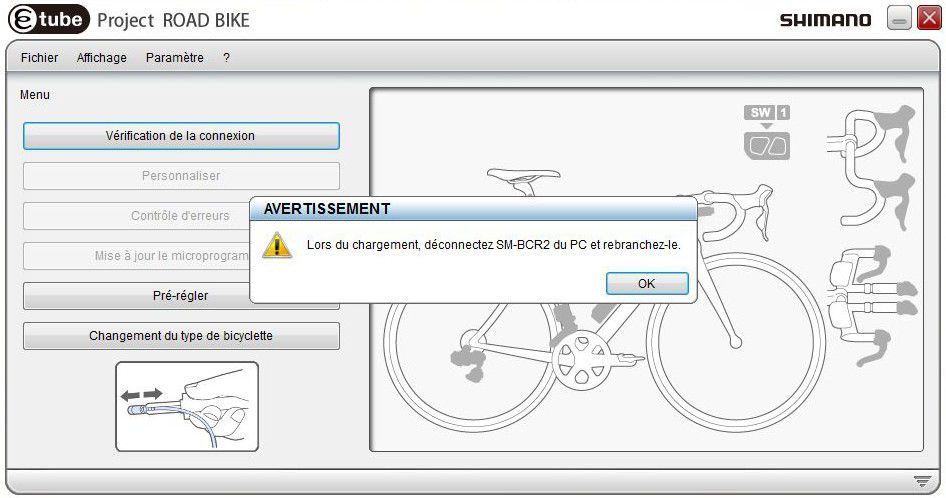
12. The changes have been successfully implemented by the Shimano Di2 control unit. You can now disconnect the USB cable from the computer. Your bike is ready to ride!
Set up a settings profile&Create a settings profile
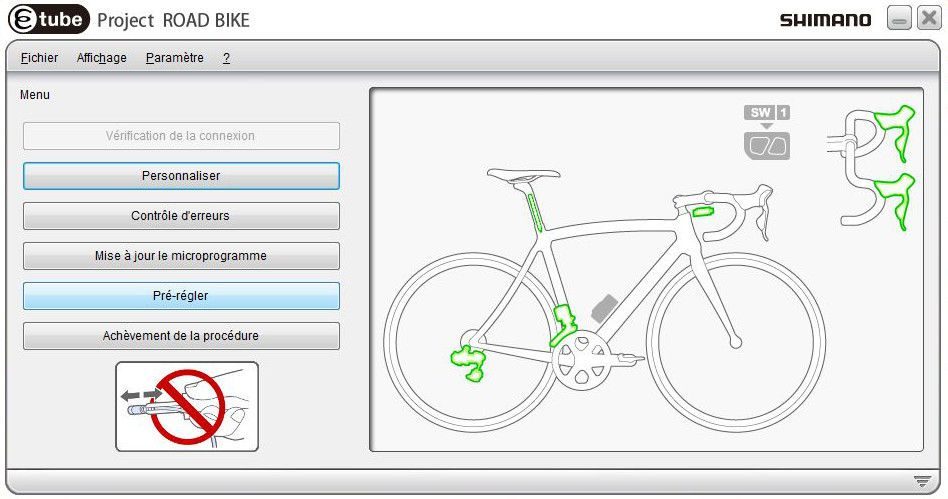
1. Please note that you can also save several different settings. On the E-tube home menu, click on "Pre-set".
2. By clicking on Read, you can select a previously saved setting. By clicking on "Save", you can create a customised, pre-saved setting.
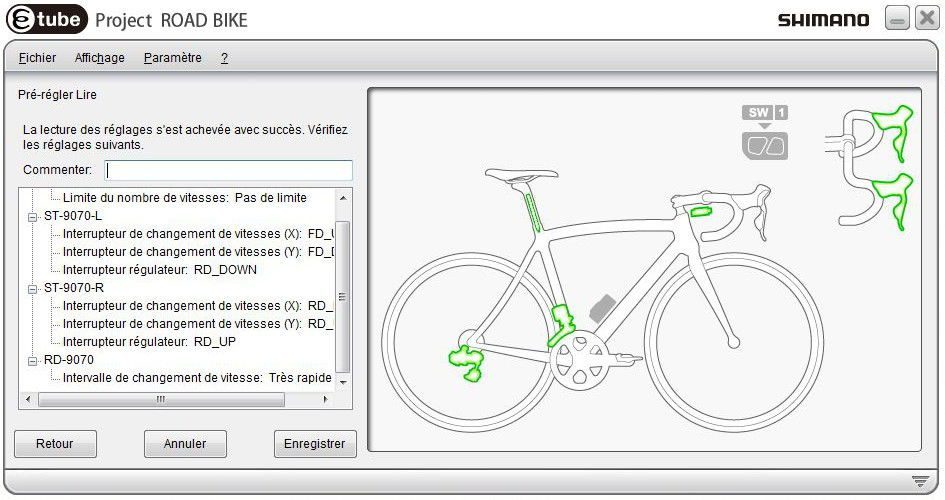
3. All that remains is to configure the Shimano Di2 group components. Finish by clicking on "Save".
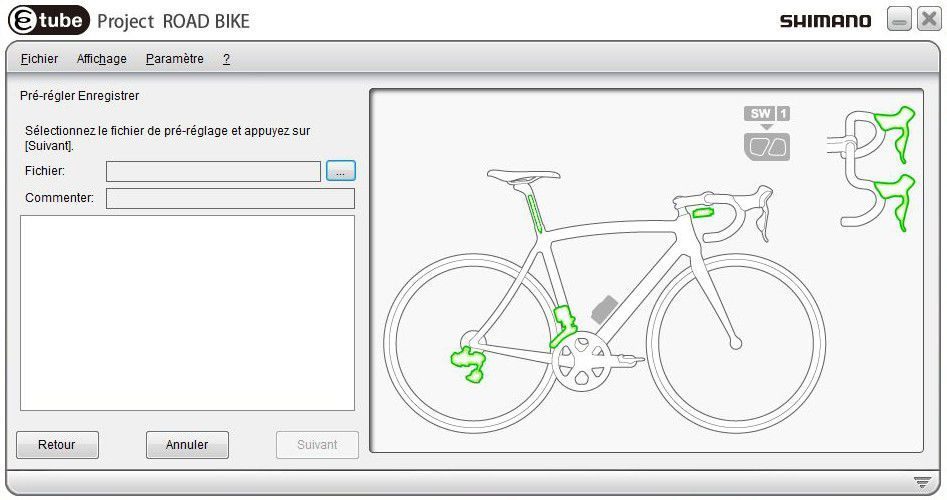
4. Name your setting and select a location on your computer. You can find it by clicking on " Read » on the "Pre-set »" menu home page.
After discussing the various customisation features offered by the E-tube software for Shimano Di2 groupsets, here is how to configure the shifters and adjust the derailleurs.br />
Here we will discuss how to configure the shifters: assigning a specific action to a shifter and determining which direction to press to shift up or down. We will also show youhow to adjust Shimano Di2 shifters using the E-tube software. It is possible to adjust Shimano Di2 shifters via the control unit, but you can also fine-tune the shifters with E-tube. To do this, you will need the Shimano SM-BCR2 charger.
1. You are on the E-tube home menu. When the menu is available, you will have downloaded the Shimano Di2 app., you will have downloadedthe latest version of the software from the Shimano website. Your charger is connected to the Shimano Di2 group control unit and your charger is connected to the computer via USB: you can start by clicking on "check connection".computer via USB: you can start by clicking on "check connection"..
2. The various components of the Shimano Di2 group are recognised by E-tube: you can choose to work on all components or select one or more from the drop-down menu. Click on "Next".
3. All Shimano Di2 group components are now connected. Click on "Finish", and you will return to the home menu.
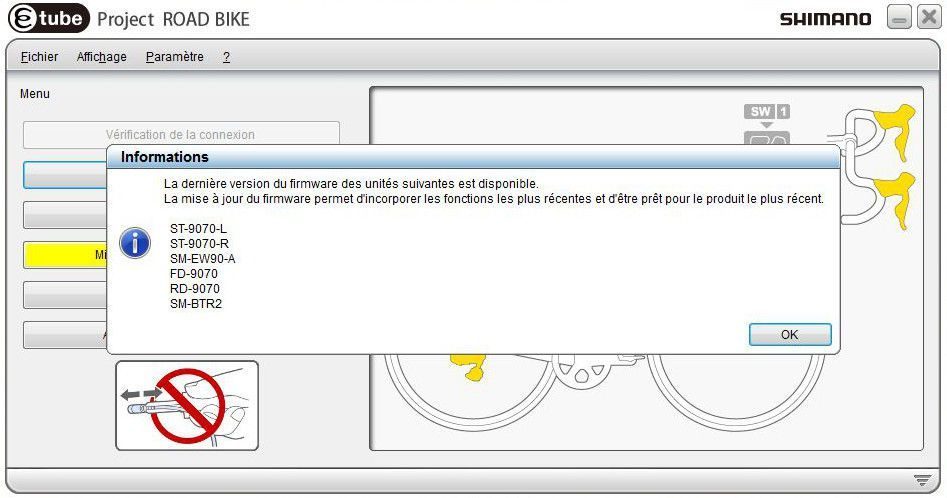
4. If Shimano Di2 group components need to be updated, a message will appear. Click "OK" and you will be directedto the "Firmware Update" menu.
5. Select the components to be updatedfrom the drop-down menu, then start the download. As the download progresses, the updated components will appear in green.
6. Congratulations, your Shimano Di2 components are now up to date! At the bottom of the menu, you can open the operation log if you want to find out what operations have been performed. You can also refer to it if any errors are reported. Click on "Finish" and you will be redirectedto the home menu.
7. Click on "Customise".
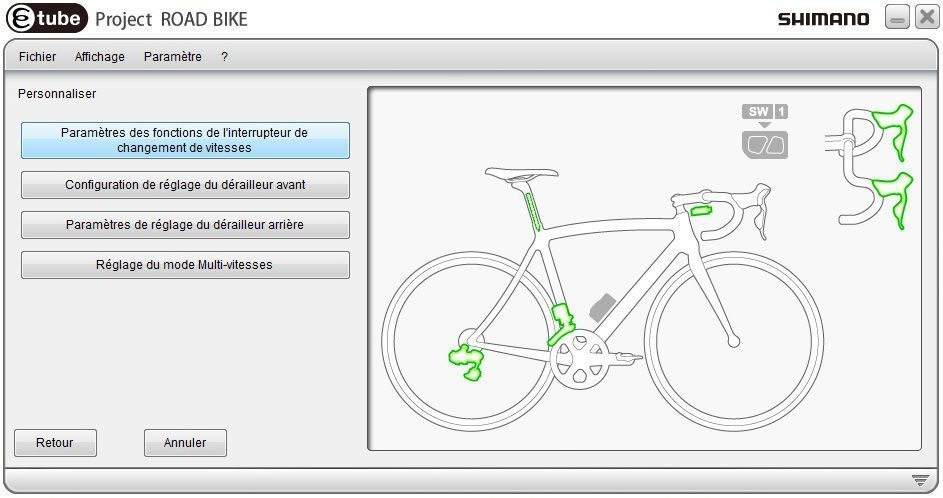
8. To configure the shifters, click on "Gear shift switch function settings".

9. You can now configure the shifters for the Shimano Ultegra Di2 and Shimano Dura Ace Di2 groupsets. Any action can be assigned to each switch on the shifter., the configuration of Shimano Di2 shifters is standard. Once the configuration is complete, click on "Configure" to save the changes, and you will be returned to the main screen., click on "Settings" to save the changes. You will be returned to the customisation menu home page.|>
Adjusting the Shimano Di2 front derailleur
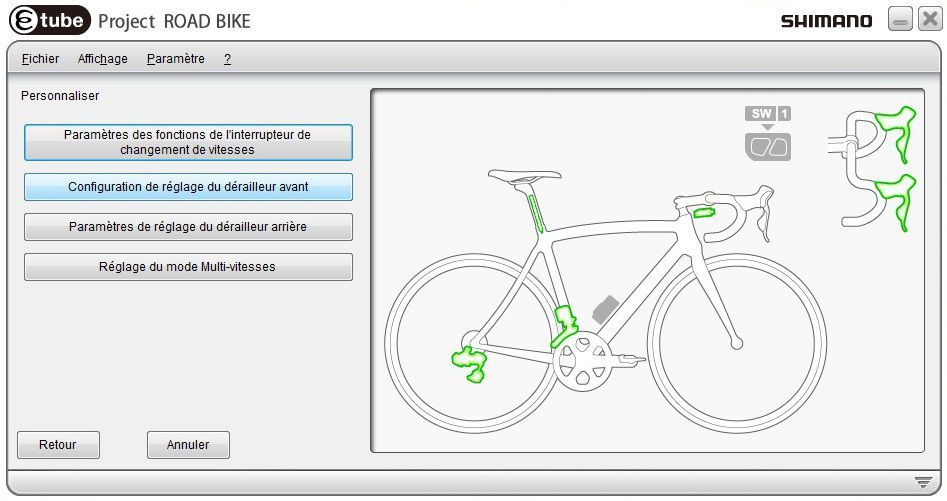
1. On the home page of the configuration menu, click on " Front derailleur adjustment setup".
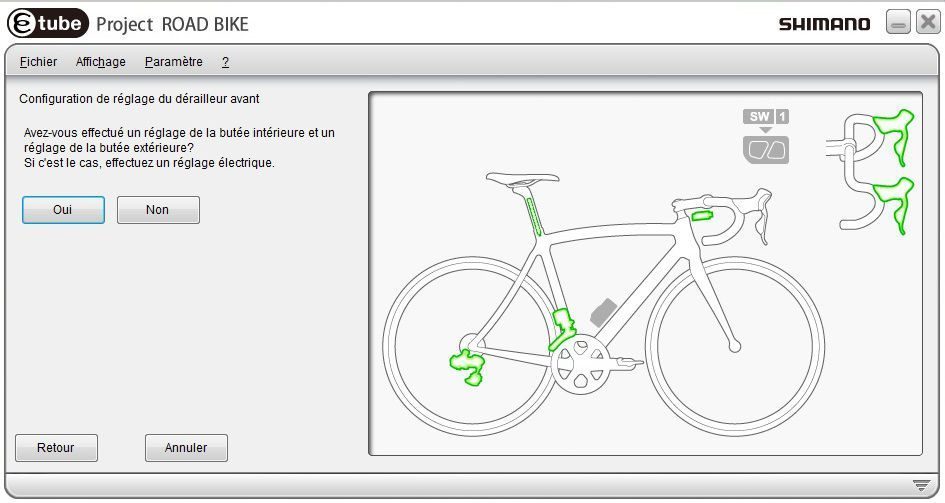
2. You will have already adjusted the inner and outer limits of the derailleur. Click "Yes" to proceed to the fine adjustment of the front derailleur. />
3. You can now fine-tune the derailleur setting for optimal performance. />
3. You can now fine-tune the front derailleur setting. You can adjust its position to a total of 24 positions, 12 to the left, 12 to the right, by clicking on "Down" or "Up".. If you would like information on adjusting the derailleur, click on "How to adjust the front derailleur". Click on " Parameters" to save the setting, you will be directed to the customisation menu home page.
Shimano Di2 rear derailleur adjustment
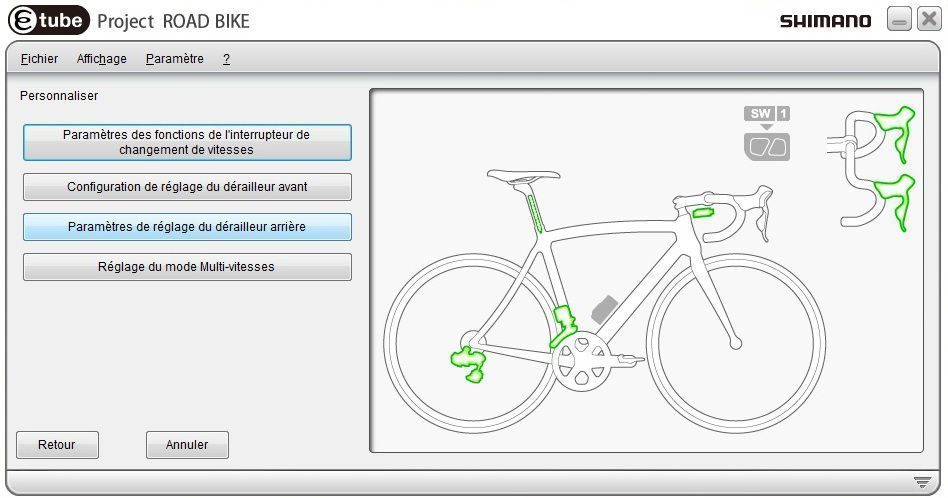
1. Click on "Rear derailleur adjustment settings".. You will be asked if you have adjusted the inner and outer stops. If so, continue.is the case, continue.
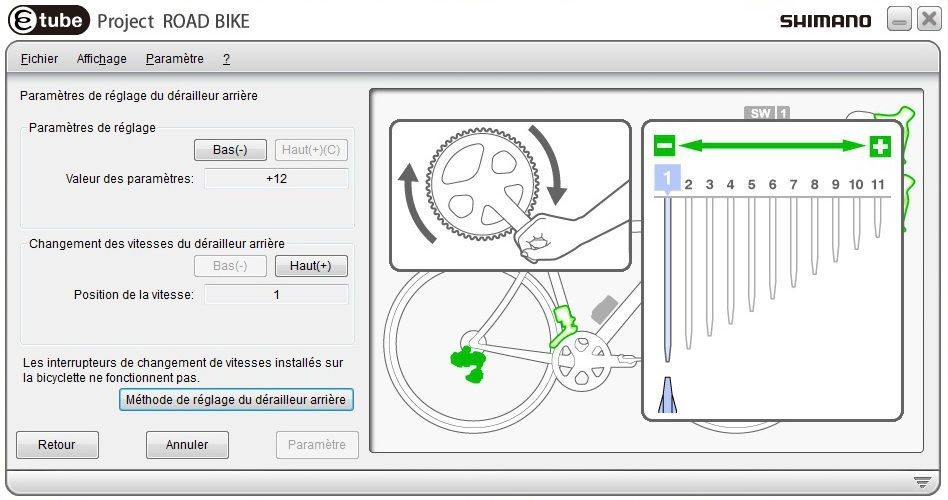
2. You can now adjust the position of the derailleur on each sprocket of the cassette. In the same way as for the front derailleur, you can change the position of the derailleur to 12 positions to the left or right by clicking on the derailleur.the same principle as for the front derailleur, you can change the position of the rear derailleur to 12 positions to the left or right by clicking on "Up" and "Down". The Shimano Di2 shifters will be deactivated: you can change gears by selecting the desired gear using the "Up" and "Down" buttons.: you can change the sprocket by selecting it from the " Gear position" menu. Once the derailleur is adjusted, click on "Set" to save the settingYou will be returned to the customisation menu home page.
3. Return to the E-tube software home menu and click on "Complete procedure"" to transfer the changes to the Shimano Di2 group components. Do not disconnect the USB cable from the computer!
4. The changes have been successfully saved by the Shimano Di2 control unit.You can disconnect the USB cable from the computer. Your bike is ready to ride!|>
Comments
Hello. My problem is different:
I have an Ultegra 6800 11v group. I changed the 11&×32 to 14×28 and now the rear derailleur no longer works... What should I do? Thanks everyone.|>
Hello,
Why do you say: "You will need to equip yourself with the Shimano SM-BCR2 charger"? Otherwise, great tutorial. Thank you
You will need the Shimano control unit (which also acts as a mains charger) to connect to the Di2 group's central unit.
Hello,
We ran a test and encountered the same problem with an FD-6770 derailleur, this time using the Shimano diagnostic tool. The front derailleur settings tab remains grey, which is not the case with the 11-speed version. We will look into this.|>
With which versions of the Di2 front derailleur is adjustment possible? With the FD-6770, the "Front derailleur adjustment configuration" menu is inactive (grey). I have the latest version of E-tube project and am using the SM-BTR2 battery charger interface. Thank you.|>
Hello, I just bought it, but I have a half compact 36-52 and a 12-28 cassette. Unfortunately, the values entered are 39-53 and 11-28. Is it possible to change this initial configuration?<ééfaut les valeurs entrées sont 39-53 et 11-28 y a t il la possibilité de changer cette configuration initiale ?
Merci
Cordialement Ana
Yes, Ana! See page 10 of the following Shimano manual:
http://e-tubeproject.shimano.com/pdf/fr/HM-R.3.2.2-00-FR.pdf
A set ofto change the parameters, provided of course that you have the SM-PCE1 tool... Best regards, Thierrygt;
Hello, I found your explanation very helpful. Now I just need to figure out how to register the software. In English, it translates into French, right? I have two questions for you: 1) Is the Di2 6770 / 10VT included in the software? 2)ordered a DI2 6770/10VT rear derailleur at the beginning of the year andafter receiving it, it was the same as the one fitted to my two 10VT bikes. When I opened it, it was the same model as the 11VT with a 6770 designation., it's the same model as the 11VT with the designation 6770-A. I put it on one of my bikes with no problem. Then one day Icharged it to make sure I could ride all weekend, and the derailleur stopped working. I tried it on another bike andon my third bike with 11 gears, nothing. I sent it back under warranty to where I bought it, and it went to Shimano FR. It came back and still doesn't work. What should I do? Thanks if you have any information for me.|>
Hello, We do not have details about the software, so it is difficult to answer your question accurately.gt; You have several options available to you. The simplest and quickest is totake your bike to a Shimano Centre, which will be equipped with a diagnostic kit. They will detect the source of the problem and, if necessary,necessary update. You can also test your bike with a derailleur that is already working on one of your other bikes. This will tell you whether the problem is with the derailleur that is being returned to the after-sales service or with the group that you have fitted. The electronic cable may bedamaged? In conclusion, based on your explanation, it is likely that this is an update that only a professional can perform or a faulty electronic component (wiring, battery, etc.).You are welcome to keep us informed of any further developments. Best regards.lt;|>
Adapting your bike to your preferencesamp;eacute;rences, that's the main advantage of electric transmission for me. Sure, maintenance and adjustments are a whole new ball game, but hey. I've only been able to try this type of transmission on a home trainer, unfortunately, but I find it really nice and comfortable.Now we just need to make it more widely available!|>
Do you have a question about this guide? Go to our contact form and select "Question about a guide" as the subject. Don't forget to tell us the name of the guide and/or its web address. Thank you.
Suggestions

TOP SEARCH CATEGORY
- Cassette
- Helmet
- Saddle
- Bottle
- Chain
- Chainring
- Tyre
- Tape
- Stem
TOP BRAND SEARCH
- Assos
- Garmin
- Gobik
- Castelli
- Pinarello
- Shimano
TOP PRODUCT SEARCH
- Shimano Ultegra CS-R8000 11-speed cassette
- Road tyre Continental Grand Prix 5000
- Shimano 105 R7000 11-speed road bike cassette
Products